



Learn how to work with user-defined types in PostgreSQL, including how to define, use, and manage them effectively. This guide explores how custom types can improve schema design, enforce data integrity, and support cleaner, more maintainable database structures in real-world applications.
I’m sure I’m not alone when I say, sometimes I get sidetracked. In this particular instance, I hadn’t intended to start learning about User-Defined Types (UDT) in PostgreSQL – I just wanted to test a behavior that involved creating a UDT. But, once I started reading, I was hooked. I mean, four distinct UDTs with different behaviors? That’s pretty cool. Let’s get into it.
What is a User-Defined Type (UDT), and why do we have them?
First, it’s PostgreSQL, so I have to address the true User-Defined Type, not simply the derived types that we’re going to talk about in the rest of the article. See, in PostgreSQL, you can quite literally build your own data type. You’ve got to break out the C compiler and write a bunch of code to input and output constructors and more. That is far beyond my capacity to describe. If you’re interested in this, I’d suggest starting with their excellent documentation.
Outside Postgres, a standard UDT is usually just an existing data type, or data types, that can be referenced as if it was a standard data type when you add a column to a table. Further, we can add rules around the data type so that we can readily enforce exactly what gets stored. It’s used for constructs that have specific use cases and rules that we want to define once, and then reuse without worrying ever again.
An example of such a set of rules would be for amateur radio call signs in the United States. We have a relatively precise system. It’s a string, up to six characters long that consists of one to two letters, a number, and then one to three letters. For example, my call sign is KC1KCE, all six characters. But my local club’s call sign is W5IAS, only five. Another example is W1AW, four characters, and the call sign for the ARRL headquarters. You get the idea. Other countries have other rules.
Now, let’s say I want to use this call sign value in multiple places in my database. I can easily create a column with a variable length limit of six characters. I can create a regular expression in a constraint to enforce the naming standard too: [A-Z]{1,2}[0-9][A-Z]{1,3}. If I decide to use call signs in multiple places in my database, I’ll be creating that column and that constraint over and over. Or, I can define it as a User-Defined Type and only define the code once. That’s the beauty of the UDT.
What User-Defined Types are available in PostgreSQL?
PostgreSQL provides four different types of UDT:
DOMAIN: a single value within the column based on an existing PostgreSQL data type that may or may not include additional constraints.COMPOSITE: more than one value within the column, again based on existing PostgreSQL data types that may or may not include additional constraints.ENUM: a data type that is pulled from a defined list, similar to a lookup table, but instead is defined within the column of a tableRANGE: an interval data type to keep numbers or dates within a certain range of values in a column.
Let’s see how each of these can be used within your database.
Get started with PostgreSQL – free book download
The DOMAIN User-Defined Type in PostgreSQL
I’m just going to take the example I outlined above to show how you could create a ‘call sign’ data type using DOMAIN in PostgreSQL:
|
1 2 3 4 5 |
CREATE DOMAIN callsign AS VARCHAR(6) CONSTRAINT valid_callsign CHECK ( VALUE ~ '^[A-Z]{1,2}[0-9][A-Z]{1,3}$' ); |
The explanation of the code is simple. The core behavior we’re after is to use DOMAIN as our own controlled type based on an existing data type. So we have to supply a name, callsign, and then a data type: VARCHAR(6). I put the limit in rather than setting it as text because we intend to control how many characters are used based on the definitions of US call signs. If we were going to store both US and UK call signs, for example, the data type would have to be limited to seven characters, not six, since the UK has different call sign rules.
With the data type in place, we then define the CONSTRAINT that is fundamental to the UDT ensuring we only get the data we want, correctly formed. You can see that using the regex we defined earlier. To put this to work is fairly straightforward – here’s an example when creating a table:
|
1 2 3 4 |
CREATE TABLE radio.us_operators (us_operators_id int CONSTRAINT pk_us_operators PRIMARY KEY GENERATED ALWAYS AS IDENTITY, call_sign callsign NOT NULL ); |
In order to test our new table, let’s try adding an incorrect call sign first:
|
1 2 3 4 |
INSERT INTO radio.us_operators (call_sign) VALUES ('2CEKCE'); |
Sure enough, this generates an error:
|
1 2 |
SQL Error [23514]: ERROR: value for domain callsign violates check constraint "valid_callsign" |
Whereas if we input a valid call sign, everything works fine:
|
1 2 3 4 |
INSERT INTO radio.us_operators (call_sign) VALUES ('KC1KCE'); |
Once a DOMAIN UDT is defined, you can’t really edit it. Instead, people will go through the process of renaming it, creating a new UDT with the newer structure and the old name, and then replacing that before dropping the old UDT. For more on the DOMAIN UDT, consult the PostgreSQL documentation.
The COMPOSITE User-Defined Type in PostgreSQL
The COMPOSITE data type again takes advantage of existing data types to build something new. However, in this case, it’s more than one value in the type. For example, in Amateur Radio, we have different bands. These are just frequency ranges with a minimum and a maximum. I’d argue that this would be best served in most relational databases by using a table, but we could create a data type as follows:
|
1 2 3 4 |
CREATE TYPE band AS ( band_name TEXT, lower NUMERIC, upper NUMERIC); |
In this case, we define the name of the band it’s lower and upper limits. We could alter the radios table to add the data type like this:
|
1 |
ALTER TABLE radio.radios ADD COLUMN bands band NULL; |
With that in place, we could add a radio and include a band for it to operate on:
|
1 2 3 4 5 6 7 8 |
INSERT INTO radio.radios (radio_id, radio_name, bands) VALUES (2, 'FT-3D', ('2 Meter',144,148)); |
In this case, I simply used the parentheses to contain the definition of the COMPOSITE value. However, we could rewrite the INSERT statement and use the ROW construct like this:
|
1 2 3 4 5 6 7 8 |
INSERT INTO radio.radios (radio_id, radio_name, bands) VALUES (3, 'THD-75', ROW('2 Meter',144,148)); |
We can query directly into the COMPOSITE type like this:
|
1 2 3 4 5 6 7 8 |
SELECT radio_name, (bands).lower AS lower_frequency, (bands).upper AS upper_frequency FROM radio.radios WHERE (bands).band_name = '2 Meter'; |
The parentheses around the COMPOSITE data type makes it clear to PostgreSQL that we are querying a composite. Otherwise, it’s likely to interpret the ‘bands’ column as another table and generate an error.
You can even nest COMPOSITE types, creating a COMPOSITE type that has other COMPOSITE types within it. Clearly, this will start to get quite messy, so should probably be avoided.
You can make changes to a COMPOSITE type. You simply use the ALTER TYPE command to make those changes. So, if we wanted to rename the attributes lower and upper to something more descriptive, we could use the following code:
|
1 2 |
ALTER TYPE band RENAME ATTRIBUTE lower TO band_start; ALTER TYPE band RENAME ATTRIBUTE upper TO band_stop; |
I could also change data types, add new attributes or drop existing ones. Now, if there are tables out there using the type already, you’ll have to be sure they’re updated using CASCADE in the command above, or going to the individual tables and updating their definition. In the case of views or functions, if you change a type that they use, you’ll have to drop and recreate those objects.
The ENUM User-Defined Type in PostgreSQL
The enumerated type (ENUM) is a list of possible values that can be in the column in question. We’d create a simple ENUM for types of radios, something like this:
|
1 2 3 |
CREATE TYPE public.transmissiontype AS ENUM ( 'Analog', 'Digital'); |
We can modify the radios table to add this data type pretty simply:
|
1 2 |
ALTER TABLE radio.radios ADD COLUMN radio_type transmissiontype NULL; |
From there, updating an existing radio with a specified transmission type is also quite straightforward:
|
1 2 3 |
UPDATE radio.radios SET radio_type = 'Analog' WHERE radio_name = 'UV-5R'; |
However, the ENUM quite strictly limits what can be added to the column. For example, this would fail:
|
1 2 3 |
UPDATE radio.radios SET radio_type = 'M-17' WHERE radio_id = 3; |
You would receive this error:
|
1 2 3 |
SQL Error [22P02]: ERROR: invalid input value for enum transmissiontype: "M-17" Position: 39 |
That’s hardly a surprise but, since the ENUM data type is case sensitive, this would also fail:
|
1 2 3 |
UPDATE radio.radios SET radio_type = 'ANALOG' WHERE radio_name = 'UV-5R'; |
The list of values in an ENUM can be modified through various means. For example, you can query the list of ENUM values, providing a start and stop point. In this example, I don’t have a start, so it’s all the values:
|
1 |
SELECT enum_range(NULL::transmissiontype); |
The values in the ENUM type are considered to be ordered by the definition order meaning that, by giving the above code a start point, it’ll find that value in the ENUM and then list values from there. You can also then ORDER BY an ENUM knowing that the order the values were defined in will be the sort order.
We can modify ENUM values as well. For example, let’s add one more, HYBRID:
|
1 2 |
ALTER TYPE transmissiontype ADD VALUE IF NOT EXISTS 'HYBRID'; |
If needed, I can control where this value gets inserted by using “BEFORE/AFTER ‘another value’” to designate the new value’s location.
If I then query the ENUM, I see the following:
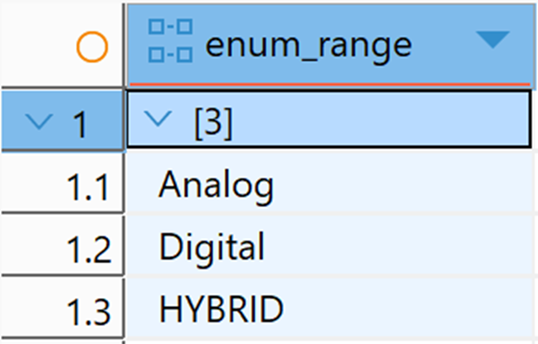
Since this isn’t following my naming standard already established, let’s change the value in the ENUM:
|
1 2 |
ALTER TYPE transmissiontype RENAME VALUE 'HYBRID' TO 'Hybrid'; |
There’s no need to do anything else since the ENUM type acts a bit like a little table – changes to it are reflected wherever it’s used. However, you can’t eliminate values once they’re in the ENUM definition, and you can’t change the order of the ENUM either; these actions would require you to drop and recreate the ENUM.
Move fast. Govern at scale.
The RANGE User-Defined Type in PostgreSQL
Earlier, I used the COMPOSITE type to define ham radio bands. However, that’s probably not an ideal use of COMPOSITE. For example, I know that I need the lower limit on the band to be less than the upper limit, yet there’s nothing in the type definition to control that. This is where the RANGE type would likely be a better choice.
The RANGE type is defined by its name: it represents a range of values with a defined start and stop, with the start being less than the stop. PostgreSQL already defines ranges for:
You can use these predefined range types as data types. However, if you want to use something not covered, such as float8, we can create our own UDT. When defining the RANGE, you provide the subtype (the data type that’s going to store the range):
|
1 2 3 4 |
CREATE TYPE frequency_range AS RANGE ( subtype = float8, subtype_diff = float8mi ); |
In addition to defining the subtype, I also have to explain which data type to use in it and provide a comparison function, subtype_diff. In this case, I can use the built-in float8mi function, but I might have to build my own – depending on what’s defined as the subtype and what rules I want to put in place in my RANGE.
Since many radios support more than one band, I’m going to slightly change the architecture of my database to take advantage of my new RANGE UDT:
|
1 2 3 4 5 6 |
ALTER TABLE radio.radios DROP COLUMN bands; DROP TYPE band; ALTER TABLE radio.bands DROP COLUMN frequency_start_khz; ALTER TABLE radio.bands DROP COLUMN frquency_end_khz; ALTER TABLE radio.bands ADD COLUMN frequencies frequency_range NOT NULL; |
I actually already had a bands table as well as a many-to-many table, radio_bands, to join between radios and bands. With this, my bands table now needs some up-to-date data:
|
1 2 3 4 5 6 7 8 |
INSERT INTO radio.bands (band_name,frequencies,country_id) VALUES ('2 Meters',frequency_range(144000.0,148000.0),1), ('70 cm',frequency_range(420000.0,450000.0),1), ('20 Meters',frequency_range(14000.0,14350.0),1), ('144MHz Band',frequency_range(144000.0,146000.0),2), ('432MHz Band',frequency_range(430000.0,440000.0),2); |
Now, I can try to add this data…
|
1 2 3 4 |
INSERT INTO radio.bands (band_name,frequencies,country_id ) VALUES ('6 Meters',frequency_range(54000.0,50000.0),2); |
…but I’m presented with an error:
|
1 2 |
SQL Error [22000]: ERROR: range lower bound must be less than or equal to range upper bound |
This is great. I don’t have to define behaviors – I just inherently receive them because I’m using the RANGE type. There’s a number of other inherent functions as well. Let’s say I have a frequency (in khz), 145000. I want to know which band, or bands, has this value. I can query the data like this:
|
1 2 |
SELECT b.band_name FROM radio.bands b WHERE b.frequencies @> 145000::float8; |
And I get this:
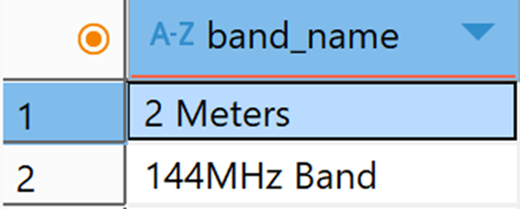
The ‘@>’ acts as a query specifying that the value is contained. We could look for overlapping bands as well:
|
1 2 3 4 5 6 7 8 9 10 |
SELECT b1.band_name, b2.band_name FROM radio.bands b1 JOIN radio.bands b2 ON b1.frequencies && b2.frequencies WHERE b1.band_name <> b2.band_name; |
In this case, the operator ‘&&’ identifies where parts of the bands overlap so we get the following:
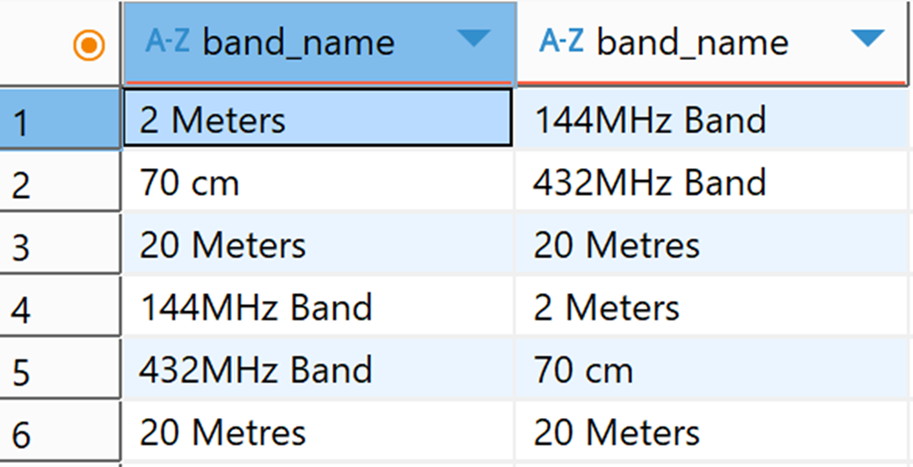
I could filter this by country to only show the overlap for one instead of all of them, for example, but there are various other functions for working with RANGE data types as well.
I did, however, make a mistake here: I added the 2 Meters frequencies in the use with an upper bound of 146000khz. It’s actually 148000khz, so I need to fix it:
|
1 2 3 4 5 6 7 8 9 10 11 |
DO $$ DECLARE newfreq float8 := 148000.0; BEGIN UPDATE radio.bands SET frequencies = frequency_range(lower(frequencies), newfreq) WHERE band_name = '2 Meters'; END $$; |
I used a variable just because I wanted to, for practice. However, you can see that I kept the existing value but referencing lower (frequencies), and then modified it by changing the upper to a new value.
There are a number of other functions associated with the RANGE type including defining the inclusivity of the upper or lower values, additional comparison functions, and more. You can’t, however, change the definition of a range once it’s in place – only drop and recreate it after removing it from all the places it’s in use.
Final thoughts & next steps
As you can see, there’s a lot of functionality in and around UDTs, and I haven’t even mentioned indexing them (yes, you can apply indexes to UDTs!) In my examples, the COMPOSITE type I created probably wasn’t the best choice. However, the ENUM and RANGE data types were the correct choices for the data in question. It’s all about figuring out what’s going to work best in a given situation.
Want to learn more PostgreSQL with Grant? Click here for the full collection.
FAQs: User-Defined Types in PostgreSQL
1. What is a User-Defined Type (UDT) in PostgreSQL?
A User-Defined Type (UDT) in PostgreSQL is a custom data type you create to enforce structure and rules in your database. PostgreSQL supports DOMAIN, COMPOSITE, ENUMand RANGE types.
2. What are the four types of User-Defined Types in PostgreSQL?
PostgreSQL provides four UDTs: DOMAIN (constrained single value), COMPOSITE (multiple related fields), ENUM (predefined value list), and RANGE (bounded interval of values).
3. When should you use a DOMAIN User-Defined Type in PostgreSQL?
Use a DOMAIN type when you need to apply consistent constraints – such as regex validation or length limits – to a data type reused across multiple tables.
4. What is a COMPOSITE User-Defined Type in PostgreSQL?
A COMPOSITE type stores multiple related fields as a single column value, similar to a structured record with named attributes.
5. How does an ENUM User-Defined Type work in PostgreSQL?
An ENUM type restricts a column to a predefined, ordered list of values. It enforces strict data integrity and is case sensitive.
6. What is a RANGE User-Defined Type in PostgreSQL?
A RANGE type stores a lower and upper bound as a single value and ensures the lower bound is less than or equal to the upper bound. It supports powerful operators like containment and overlap checks.
7. Can you modify PostgreSQL User-Defined Types after creation?
Some UDTs can be altered (such as adding ENUM values or modifying COMPOSITE attributes), but others – like DOMAIN and RANGE definitions – often require dropping and recreating the type for structural changes.
This document contains proprietary information and is protected by copyright law.
Copyright © 2026 Red Gate Software Limited. All rights reserved






Load comments